About intents
- Explanation
- 7-min read
Intents are the platform mechanism for context-aware cross-app navigation. When a user interacts with a resource—such as an entity, a metric, or a DQL query—and wants to do something with it in another app, an intent carries the relevant context from the source app to the target app through the AppShell.
Every Dynatrace app runs inside an iframe hosted by the AppShell. Regular links can navigate between apps, but they can't carry structured context with them. Intents solve this: they let your app pass data—entity IDs, timeframes, queries—to another app in a way the platform can coordinate, so the target app knows what to show.
How to deliver an intent
Intents reach users through different mechanisms, ordered by specificity. Choosing the right one determines whether users land where they need to go or get stuck picking from a list.
Explicit intents
Use an explicit intent when your app knows exactly where to send the user. The user clicks, the target app opens with all context applied. No dialog, no choices.
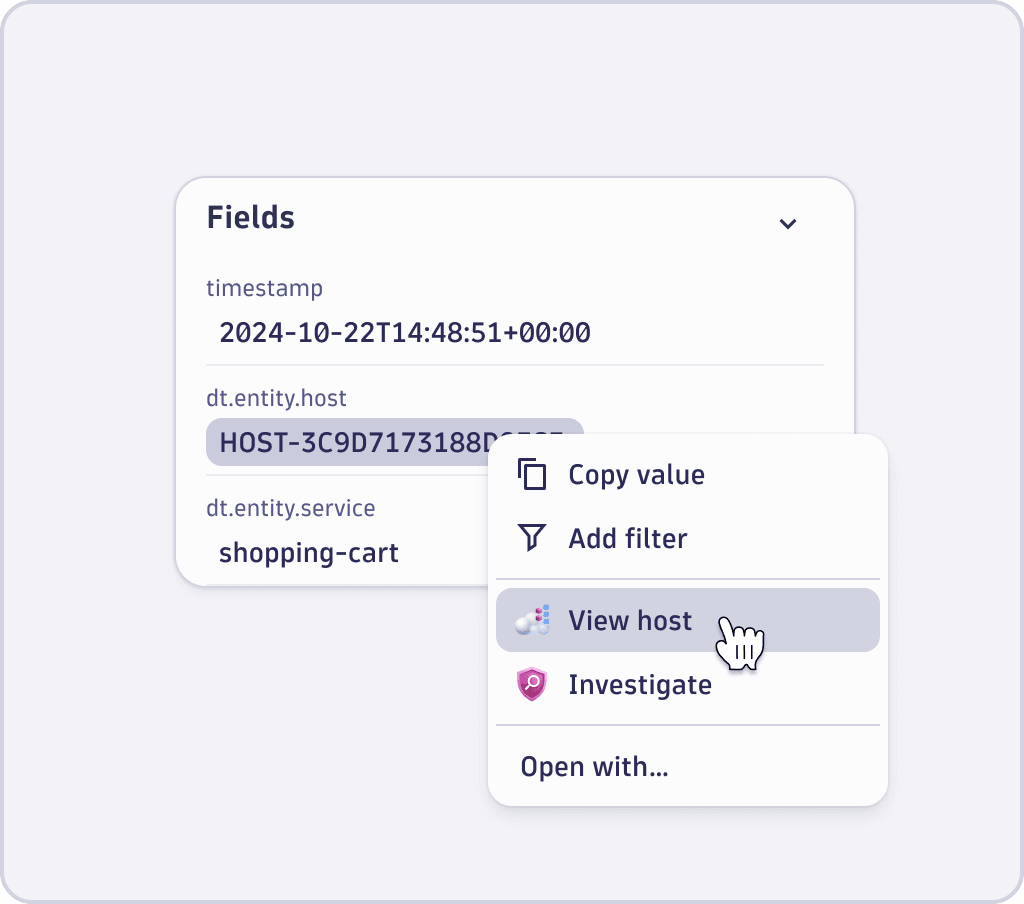
This is the most common pattern. It powers primary actions in intent menus and the left side of the IntentButton split button, the primary action such as View in Hosts or Open in Notebooks.
-
When to use—the target app and action are obvious for the resource type. You're connecting a host entity to the Hosts app, a trace ID to Distributed Traces, a DQL query to Notebooks. The 80/20 case.
-
How it works—your app calls
sendIntent()with arecommendedAppIdandrecommendedIntentId, or uses the<IntentButton>with those options set. The AppShell skips the Open with... dialog and opens the target app directly.
<IntentButton
  payload={{ 'dt.entity.host': 'HOST-F66B242CD3A5E38E' }}
  options={{
    recommendedAppId: 'dynatrace.classic.hosts',
    recommendedIntentId: 'view-host',
  }}
>
  View in Hosts
</IntentButton>
Do not hardcode your own entity-to-app mappings. Use the platform's recommended intents mapping to determine which target app and intent ID to use for a given resource type. This keeps navigation consistent across the platform.
Add-ons
Use an add-on when the user should stay in the current app but borrow functionality from another. The target app renders inside an overlay. The user's context is preserved, and they return to where they were when they close it.
-
When to use—when leaving the current app would disrupt the user's workflow. The user needs a capability from another app without leaving their current context. For example, creating an alert from a dashboard tile, or playing back a Session Replay inside a detail view.
-
How it works—the target app declares an
overlaymode in its intent configuration. When your app triggers the intent, the AppShell loads the target app's iframe inside an overlay instead of navigating to it.
{
  "intents": {
    "create-alert": {
      "description": "Create an alert",
      "addonMode": "overlay",
      "properties": {
        "dt.query": { "required": true, "schema": { "type": "string" } }
      }
    }
  }
}
Add-ons differ from Design System components: a DS component gives you building blocks to shape your own UI, while an add-on delivers a self-contained experience built by a specialist team. Use an add-on when you need expert functionality (like Session Replay or anomaly detection) to appear identically across multiple apps.
For details on building and consuming add-ons, see Add-on intents.
Application add-ons should not open other application add-ons. Currently, if an add-on triggers another add-on, the calling add-on closes and the new one opens, losing the user's context. Proper stacking for platform-level system primitives—such as the intent picker, file upload, or permission prompts—is in development.
Open with... dialog (fallback)
The Open with... dialog is the fallback that surfaces every app capable of handling the current intent payload. It appears when no explicit intent is configured or when the user deliberately wants to see all options.
-
When it appears:
- Your app calls
sendIntent()without specifying arecommendedAppId. - The user clicks the three-dot menu on an
IntentButtonand selects the Open with... option. - The
recommendedAppIddoesn't exist or can't handle the payload.
- Your app calls
-
What to know:
- Always provide this as a fallback. Do not suppress it.
- In the
IntentButtonsplit button, the Open with... option sits at the bottom of the three-dot menu, after explicit intents and add-ons. - The label must be exactly
Open with...with no variations.
The IntentButton
The IntentButton is a split button from the Strato Design System that implements all three mechanisms in one component. The left side triggers the primary explicit intent directly, for example, View in Hosts. The right side opens a menu with additional explicit intents, add-ons, and Open with... as the last option.
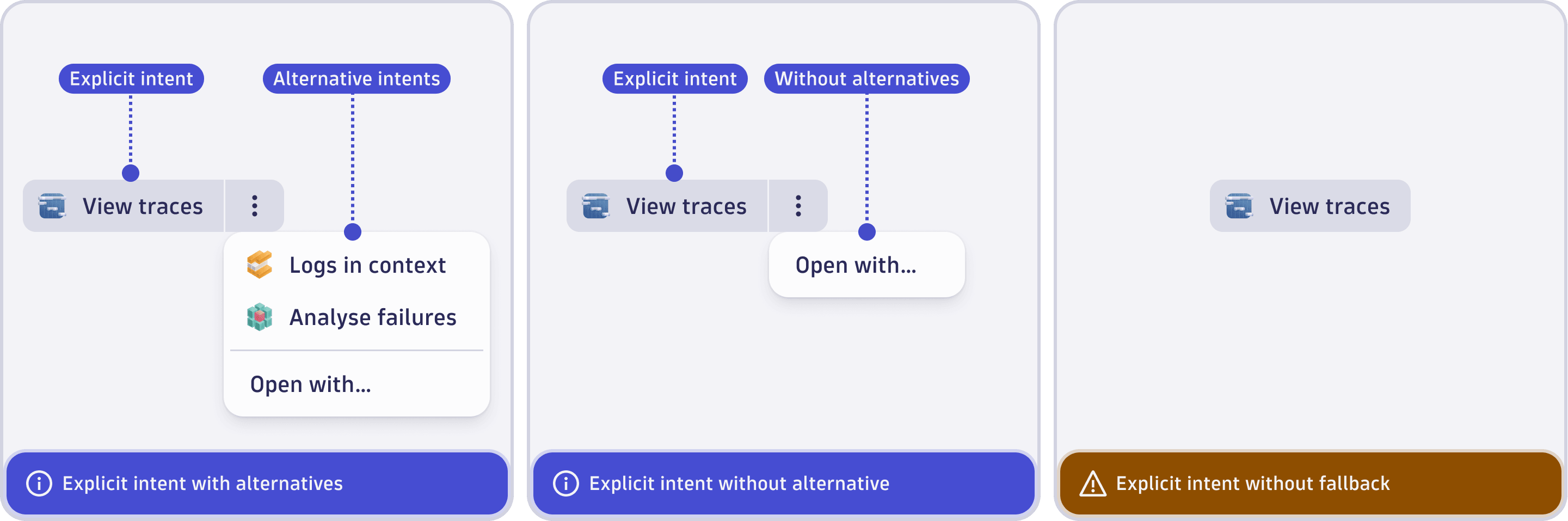
Use IntentButton for straightforward cases. Use sendIntent() from @dynatrace-sdk/navigation when you need more control over the trigger. For example, responding to a table row click or a custom interaction.
Recommended intents
Without central coordination, each app builds its own mapping from resource types to target apps. This creates inconsistency: clicking a host ID in one app opens the Hosts app, while clicking the same ID in another opens something different.
Recommended intents solve this with a centrally managed mapping from resource types to recommended target apps. Instead of hardcoding recommendedAppId: 'dynatrace.classic.hosts' in your source code, you query the recommended intents list to get the right target for dt.entity.host.
This ensures users always land in the same destination for the same resource type, regardless of which app they started from.
How intents work under the hood
Lifecycle
-
Source app sends an intent—your app calls
sendIntent(payload, options)or renders an<IntentButton>. The communication uses thewindow.postMessageAPI to reach the AppShell. -
AppShell resolves the target—if a
recommendedAppIdandrecommendedIntentIdare provided and valid, the AppShell opens that app directly. Otherwise, it finds all installed apps whose intent declarations match the payload properties and shows the "Open with..." dialog. -
AppShell launches the target app—the target app opens in an iframe (full page for navigation intents, overlay for add-ons). The intent payload is passed as URL query arguments.
-
Target app handles the intent—the target app calls
getIntent()to read the payload and perform the requested action.
Intent matching
The AppShell matches an intent payload against every installed app's intent declarations in app.config.json. A match occurs when an app declares intent properties that the source app's payload satisfies:
- If the target declares
dt.entity.hostasrequired: true, the source must includedt.entity.hostin the payload. - Extra properties in the payload that the target does not declare are stripped before delivery.
- Use
keyPropertiesinsendIntent()to narrow matching when your payload contains multiple properties.
Payload structure
An intent payload is a set of key-value pairs carrying the context to share:
import { IntentPayload } from '@dynatrace-sdk/navigation';

const intent: IntentPayload = {
  'dt.entity.host': 'HOST-F66B242CD3A5E38E',
  'dt.timeframe': { from: 'now-2h', to: 'now' },
};
Common payload properties include entity IDs (dt.entity.*), DQL queries (dt.query), and timeframes (dt.timeframe). The target app defines which properties it accepts and requires in its intent declaration.
Limitations
- One-way payload delivery—the initial intent payload is passed via URL query arguments when the target app loads. For two-way communication, use intents-with-response, where the target add-on can pass data back asynchronously.
- Keep payloads concise—while the previous URL length limitation has been fixed, it's still best practice to pass identifiers and queries rather than large data blobs.
Security context
Every Dynatrace app runs inside its own cross-origin iframe in the AppShell. API calls from any app, whether it opened via a regular intent or as an overlay add-on, run under that app's security context, not the calling app's. Each app uses its own identity, OAuth scopes, and permissions.
Cross-origin iFrames comply with the AppShell's Content Security Policy rules.
Context sharing
When a target app opens through an intent, it can access:
- Platform context shared between all apps: timeframe, segment, tenant info
- Intent payload—the specific data passed by the source app via the intent
- The target app does not have access to the source app's internal state beyond what is in the intent payload.
This applies equally to full-page navigation intents and overlay add-ons.
Intents as public APIs
Intents behave like public APIs. An app's intent types define its public contract. Consuming apps can rely on a specific intent type always accepting the same payload shape.
- Intent types have owners, just like API owners own API types.
- The intent type name and its required properties form a stable interface.
- Breaking changes to an intent's required properties are breaking API changes and require a deprecation process to phase out safely.
Choose the right mechanism
| Scenario | Use | Why |
|---|---|---|
| User clicks a host entity and should open in the relevant app | Recommended intent | Resolve the target app dynamically, do not hardcode the destination |
| App needs to support a resource type it cannot predict upfront | Open with... | Let the platform's matching find the right targets |
| User wants to create an alert from a dashboard query | Add-on | User should stay in the dashboard, not navigate away |
Intent naming guidelines
Every intent has two user-facing identifiers, which affect discoverability and clarity:
- The intent ID—which is the key in
app.config - The description—shown on hover in the intent menu
Intent IDs
The intent ID is the key you declare in your app configuration under app.intents. It should be short, lowercase, and describe the action your app performs.
Use kebab-case for new intent IDs:
| Do | Don't |
|---|---|
view-host | ViewHost |
share-chart | shareChart |
create-alert | alert |
view-host-v2 | view_host_deprecated |
Some older intents use snake_case as in view_host or view_service. Both formats work, but kebab-case is the preferred convention for new intents.
Follow these rules:
- Use lowercase letters, underscores, and hyphens only. No spaces, no camelCase.
- Start with a verb that describes the action. For example,
view,create,edit,share,add, oranalyze. - Don't include the app name. The intent ID should describe the action, not the destination. The platform maps actions to apps.
- Don't include
deprecated,new, oroldin the intent ID. Use a-v2suffix for versioned replacements. - Keep it short. The ID appears in URLs and API calls.
Descriptions
The description field is a short sentence that appears as the label in the intent context menu and in the Open with... dialog. It tells the user what will happen.
Follow this format: [action verb] + [object]. See the following table:
| Good | Bad | Why |
|---|---|---|
| "View the host" | "Host" | Names the destination, not the action |
| "Add to dashboard" | "Dashboard" | Names the destination, not the action |
| "Analyze query results" | "Notebooks" | Users choose by action, not app name |
| "Create alert" | "Alerting" | Gerund or category name, not an action |
The description should complete the sentence This will.... If This will Host doesn't make sense, rewrite it.
Next steps
- Add-on intents: Build in-context overlay experiences
- Send intents—define payloads and trigger intents from your app
- Receive intents—declare intent types and handle incoming payloads
- Debug intents—troubleshoot intent matching and delivery