Debug intents
- Explanation
- 1-min read
When intents don't behave as expected, you can diagnose the problem with browser console methods and common troubleshooting patterns.
Browser console methods
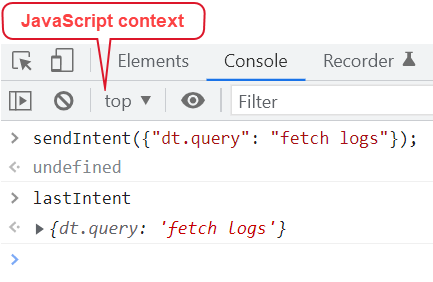
The AppShell exposes two global methods for debugging intents from the browser's developer tools.
Prerequisites
- Open your browser's developer tools by pressing F12 or
Ctrl+Shift+Iin Windows/Linux andCmd+Option+Iin Mac. - Set the JavaScript context to top, not the app's iFrame. This is important because the AppShell methods are only available in the top-level context.
sendIntent method
Use this method to test the receiving side of your app without building the sending UI first. The global sendIntent method has the same functionality as the SDK method.
Use it to manually trigger an intent from the console and test how the AppShell resolves it:
// Test if your intent payload opens the right target
sendIntent({ 'dt.entity.host': 'HOST-F66B242CD3A5E38E' });

// Test with explicit target to bypass the dialog
sendIntent(
  { 'dt.entity.host': 'HOST-F66B242CD3A5E38E' },
  {
    recommendedAppId: 'dynatrace.classic.hosts',
    recommendedIntentId: 'view-host',
  },
);
lastIntent variable
Use it to verify that the source app sent the payload you expected. If the payload is missing properties or has unexpected values, the issue is on the sending side. The lastIntent variable holds a reference to the most recently sent intent in your browser window:
lastIntent;
// -> { intentPayload: { 'dt.entity.host': 'HOST-F66B242CD3A5E38E' } }
Troubleshoot common problems
No matching app
Nothing appears in the Open with... dialog. The AppShell found no installed app whose intent declarations match the payload properties.
Check the following:
- Is the target app installed?—the app must be installed in the environment. Check the Hub.
- Do the required properties match?—the target app's intent declaration must have
required: truefor at least one property that the source app includes in the payload. Open the Intent Explorer and compare. - Is the property name exact?—property names are case-sensitive.
dt.entity.Hostis notdt.entity.host. - Is the schema type correct?—if the target declares
"schema": { "type": "string" }but the source sends an object, the match fails.
App matches unintended payloads
Your app's intent declaration is too broad, so it matches payloads you didn't intend.
Check the following:
- Are your required properties specific enough?—if your intent only requires
dt.query, which is a very common property, your app matches almost every intent that includes a query. Add more required properties to narrow the match. - Is this a self-intent?—your app may appear in its own Open with... standalone dialog when you send an intent with properties your own app also handles. This is expected behavior. Use
keyPropertiesinsendIntent()to narrow matching.
Intent opens the wrong app
When using recommended intents, the recommendedAppId or recommendedIntentId may be wrong.
Check the following:
- Verify the recommended intent mapping—look up the correct app and intent ID for your resource type in the recommended intents list.
- Fallback behavior—if the
recommendedAppIddoes not exist or cannot handle the payload, the AppShell falls back to the Open with... dialog. This is by design, not a bug.
Target app receives incomplete properties
The AppShell strips payload properties that the target app does not declare in its intent configuration.
Check the following:
- Declare all properties you need—in your
app.config.json, every property your app needs to read must be listed in the intent'spropertiesobject. Undeclared properties are silently removed. - Use
lastIntenton the target side to see the full payload as received.
Add-on overlay doesn't open
The intent opened the target app in a new page instead of an overlay.
Check the following:
- Is
addonMode: "overlay"set?—the target app's intent declaration in theapp.config.jsonfile must include"addonMode": "overlay"for the intent to render as an add-on. You can verify this in the Intent Explorer's Intent Properties panel. - Is the add-on triggered from within another add-on?—currently, when an add-on triggers another add-on intent, the calling add-on closes and the new one opens. This is a known limitation. The calling context is lost.
Intent payload is too large
This was a known issue where the AppShell encoded intent payloads as URL query arguments, and very large payloads caused rendering errors. This has been fixed.
If you still encounter payload size issues, keep payloads concise as a best practice: pass identifiers (entity IDs, query strings) rather than large data objects. If you need to share a large dataset, pass a reference (for example, a document ID) and let the target app fetch the data.
Next steps
- About intents: Overview of the three intent mechanisms
- Add-on intents: Build in-context overlay experiences
- Send intents: Define payloads and trigger intents
- Receive intents: Declare intent types and handle incoming payloads